
Trail through the Readout: Home Seven-leg guide
A Pandagoo order in seven legs, with the numbers at each
How to use Pandagoo and this Spreadsheet together, step by step: from opening an account to a claim after delivery, with the archived figures that applied at each leg.
This guide follows the archived Pandagoo screens in order. Pandagoo's own guide pages were never saved and the site does not load today, so there are no official screenshots or videos to show; the picture spaces are kept for them should any surface. The route also matches how most agents work, so it remains useful elsewhere.
Start on our product shelves or with the search box: find a product, copy its listing link, then follow the legs below.
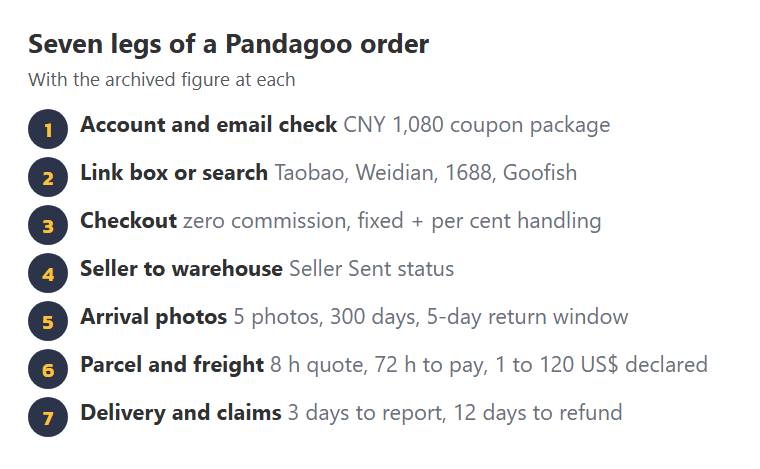
First leg: account and the email check
- CNY 1080 coupon package
- 6+ password characters
Registration took an email and a password of more than six characters; the code also wired up sign-in with Discord. Right after sign-up a prompt asked for email verification, warning that an unverified account "may not place order successfully" and offering the CNY 1,080 shipping coupon package as the reward.
Before going further we would add a delivery address. The address form had a text and image recognition helper for Chinese addresses, with its own warning that it "may not be 100% accurate", and a tip to enter 0000 where there is no postcode.
Second leg: link box or product name search
- Taobao
- Weidian
- 1688
- Goofish
The main box accepted a product name or a link ("Product name/Link"). For links the system could read, a product page opened with options and price; for the rest, a manual purchase form asked for the link, name, specification, unit price in yuan, quantity, seller postage and a note. Branded items could trigger the commodity risk prompt at this point.
Choose options carefully. On 1688 the price you see may only apply from a minimum quantity; the reading listings page shows how to spot that.
Third leg: checkout under the payment formula
- 0 buying commission
- fixed + % handling
- 09–18 Beijing buying hours
The cart showed goods, "Seller 》 Warehouse shipping fee" and a subtotal "excluding international shipping". At payment, the handling formula added its fixed and percentage parts for the method you chose. Purchases were then placed during 09:00 to 18:00 Beijing time.
If a seller had a discount the cart did not show, a price-change form let you give a reason ("the price of negotiation with the seller", "Mobile-exclusive offer" and others) for staff to confirm.
Fourth leg: seller to the Pandagoo warehouse
- Seller Sent status
- 5 / 3 seller reply days
Once paid, the order waited for the seller to post the goods to the warehouse, shown as "Seller Sent". If the price turned out higher than you paid, a "Pending to pay difference" state appeared. Delays here belong to the seller; the archive lists "Average Arrival Time to Warehouse" as a figure shown per product, which was not saved.
Fifth leg: arrival snapshots and the three-hundred-day count
- 5 photos per item
- 300 days free storage
- 5 days to request a return
Every box was opened on arrival for a banned-goods check. Each item got five inspection photos, with extras free on request. The storage clock started now, and so did the five-day window for returning goods to the seller.
Open the photos the same day and run the five checks from the warehouse plates: count, measure, label, variant, stress points.
Sixth leg: packing quote, freight payment, dispatch
- 8 h manual quote
- 72 h to pay
- 1–120 US$ declared
- 3 parcel photos
Select goods, choose a system or manual quote, fill in the address and declared value, and submit. Pay within 72 hours. Optionally buy a rehearsal package first to see the real weight. After packing, three photos of the parcel are taken, and the freight is settled up or down for a system quote.
Seventh leg: delivery, claims and refunds
- 3 days to report
- 12 days to refund
Tracking runs until delivery. Problems go to support within three days of receiving the parcel, with unpacking photos and video. Refunds for agreed returns arrive in the account balance within twelve days. Import tax, if charged, is yours to pay.
- Product shelves pick something to follow through the legs
- Calculators payments and deadlines for your order
- Figure board every number in one place